ResourcesImplementing Signals and Attribution for Power Law Businesses
Reports run on PRO, never on raw data
Why reports read the PRO fields and never the raw data, the order to cut the data in, the map files that keep it consistent, and the first question to settle.
Chapter 4 of 7 · 12 min read · A guide by Broad Eye Solutions · Version 1.0 · Updated November 3, 2026
Chapter 4 of 7All chapters
- 1 Where the thread breaks
- 2 One ID and the funnel
- 3 Capture every lead
- 4 Reports run on PRO, never on raw data
- 5 One question that sorts
- 6 Tell the platforms
- 7 Close the loop
- Sources
Don’t run reports on raw data. Not the CRM’s lead source field, not the tags on the form, not a platform’s own count. Each of those was captured by a different system for its own purpose, each one is missing or wrong on some share of the leads, and a report built on any one field is only as accurate as that field. Reports should read a separate layer, built for one job: attribution accurate enough to act on.
That layer is the PRO fields. PRO stands for Performance Revenue Optimization, and it’s how ABPRO_, the Broad Eye Solutions platform, builds every client’s reporting.
- The raw data is the evidence. The tracking tags, click IDs, capture URL, referrer, browser, form and CRM fields, exactly as each system captured them. It’s kept, it’s never edited, and no report reads it directly.
- The PRO fields are what every report reads. Each one is mapped to a value in the reporting vocabulary, so a value means the same thing in every report, every month. And each one is resolved from everything known about the lead, not from a single field. A lead whose tags were stripped on the way in still carries the form it came through, the traffic that form was built for, the browser it was sent from and the address of the page, and together they say where it came from.
zNAAfills a PRO field only where the evidence runs out. It stands for no attribution available, and it goes at the level where the trail stops. Everything the evidence does settle keeps its value. A web lead with no tags, no click ID and no referrer still has its form and its site, so its source iswebsiteand its medium iszNAA.
Each PRO value is the verdict reached from all of the evidence, with the piece that decided it named beside it, and it can be corrected without touching the raw data.
| PRO field | The question it answers | Values |
|---|---|---|
| Brand | Which brand did the lead engage with? | Brand, Non-Brand |
| Capture Group | Did it come from the website? | Web, Non-Web |
| Capture Method | How did it get into the CRM? | Web Form, Live Chat, Inbound Call, Referral, Third Party API, List, Manual Entry |
| Conversion Point | Through which door, exactly? | The form ID, tracking number, chat or partner |
| Class | Did an investment bring it? | Investments (ads, sponsorships, trade shows, referral partners), Inbound (what arrived with none), zNAA |
| Category | What kind of investment brought it? | Advertising, Affiliate, Organic, Direct Sales, Legacy (a list loaded into the CRM), zNAA |
| Source | Which platform or channel? | meta, google, microsoft, linkedin, newsletter |
| Medium | The first cut of that platform’s spend, in the value its own report uses | Meta: facebook, instagram, messenger, audience_network. Google: Search, Display, Video, Performance Max, Demand Gen, Shopping. LinkedIn: SPONSORED_UPDATES, SPONSORED_INMAILS, TEXT_AD, DYNAMIC. Not ads: content for your own posts on a platform, email, and organic for a visit with no tags, sourced from its referrer (set by PRO, never a tag) |
| Campaign | Which campaign? | Its reporting name, with one key however often it’s renamed |
Leads a rep keyed in get their own category, Direct Sales. They convert differently from anything marketing bought, and mixed in with the rest they flatter whichever channel they land in.
The order of evidence
Each PRO field reads all of the lead’s evidence, strongest first, and takes the first piece that settles it.
Every tracking value is read from the lead’s own stored field first, then from the capture URL. For the source, that’s the utm_source tag (through the source map, so “Facebook” and “fb” both become meta), then a click ID (a gclid means Google, an fbclid means Meta), then the traffic the form was built for (from the form map), then the in-app browser (Instagram’s browser means Meta), then the referrer (google.com means Google, facebook.com means Meta). A web lead with none of these takes website, or the site’s own domain, as its source, grouped by its form ID. When nothing settles a field, the value is zNAA. The z sorts it to the bottom of every list, where it belongs.
For the medium, read in the source’s own vocabulary, it’s the utm_medium tag (through the medium map, so “ig” becomes instagram and Google’s “cpc” becomes Search), then the in-app browser (Instagram’s browser means instagram), then the form’s built-for medium. A source that came from the referrer gets the medium organic, and the website fallback gets zNAA.
For the campaign, it’s the campaign ID first, through the campaign map, and the name when the ID is missing or not in the map yet.
The figure below runs seven common leads through that order.

Look at the first two leads in the figure. The first opted out of tracking and came in through a form tool that keeps only the page address, so every tag field is empty, and the capture URL still names the medium, the campaign and the ad. The second lost its tags before the page loaded, so the capture URL is bare too. It came in on a form that only runs in Meta ads, and the browser was Instagram’s own, so PRO still resolves it to Advertising, Meta, Instagram, and the record says exactly why: the source basis reads form_default:WF-0001 and the medium basis reads in_app:instagram. Without the form ID, that lead lands in “unknown,” and Meta looks worse than it is.
Every value shows its basis
Each PRO field has a basis column beside it, naming the evidence that decided it: utm_source, capture_url:utm_source, click_id:gclid, form_default:WF-0001, in_app:instagram, campaign_map:utm_campaignid, none. That makes PRO auditable, and it does something more useful too. When a share of Meta’s leads starts resolving from the form default instead of from utm_source, something is stripping the tags, and the basis column is where it shows up first.
Don’t guess
- A value the maps don’t know is kept as it arrived and flagged, then added to its map for someone to review. It’s never filed under something else to make a report look tidy.
- With nothing to go on, the answer is
zNAA. It’s a real finding, with its own line in every report. Some reports roll it into brand, on the reasoning that demand nobody can trace is demand the brand created. If yours does, keepzNAAvisible underneath, so the gap stays a gap. - Tests, spam, duplicates and out-of-scope records (job seekers, existing customers asking for support) are labeled, never deleted. They stay in the raw data, and every performance number leaves them out.
- A correction to one lead goes in an overrides table (the lead ID, the field, the new value, who decided and why), applied on top at every rebuild. Nothing writes back into the CRM’s raw fields or the form data.
Cut the data in order
The order you cut the data in decides what you can see. The blueprint cuts it the same way every time:
- Label what isn’t in scope. Tests, spam, duplicates and out-of-scope records, so every number after this leaves them out.
- Brand against Non-Brand. The main brand, then everything else.
- Web against Non-Web, then the capture method. The website’s leads, then each other door on its own line.
- Class, category, source, medium, campaign. Each level a subcategory of the one before it, in the same vocabulary everywhere. Investments, Advertising, Meta, Instagram, one campaign, the same path in every report, every month.
At each level, aim for three to five groups, keep “other” and zNAA together under about a fifth of the leads, and split any group big enough to matter. The best level to report on isn’t the most detailed one. It’s the one whose groups differ the most from each other, because that’s where a decision changes what happens next.
Map the values instead of editing the CRM
The values in a PRO report are almost never a CRM field read as it stands. The CRM field is evidence. A map turns it into a value you can report on, the same way every month.
Think about what a CRM’s lead source field holds after a few years: whatever anyone, or any integration, ever put in it. “Facebook,” “facebook,” “FB,” “Meta Ads,” a partner’s name, a rep’s best guess. Report on it directly and the answer changes every time someone types differently. Fix it in place and it gets worse: the history changes, nobody can tell what it said before, and the next import brings the old spellings right back.
So the build has three layers:
- Raw is the system of record and the exports pulled from it: the CRM, the form submissions, each platform’s spend export. It stays exactly as it arrived.
- Maps are small tables, kept as files, with one row for each raw value (or each combination of raw values) and the reporting value it stands for. This is where people make decisions: what “fb” means, which campaign belongs to which group, which form was built for which channel.
- PRO is computed, never typed. Every run rebuilds it from the raw data and the current maps, so a change to a map applies to every past and future lead at once.
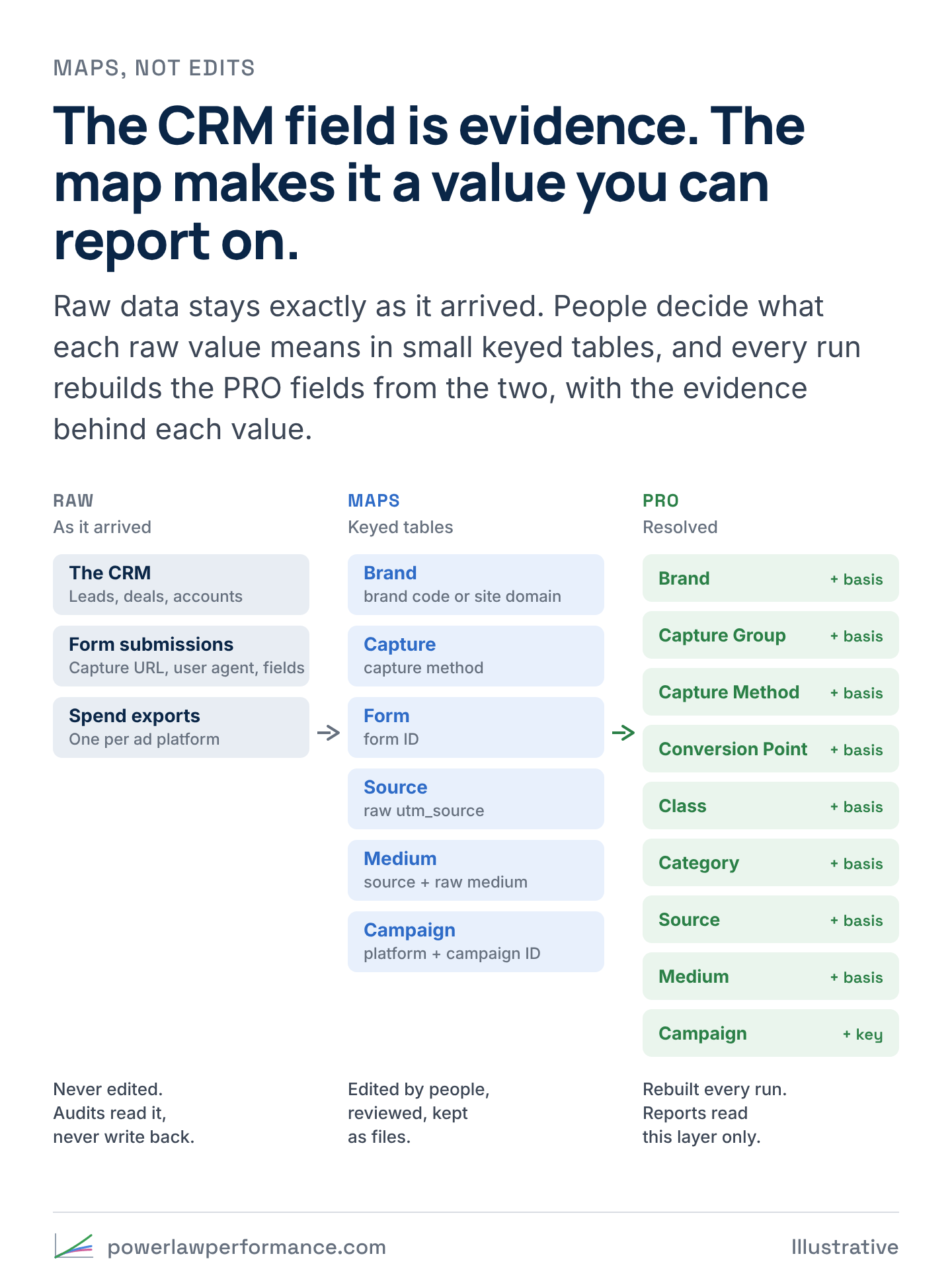
A map row has a key, the value it maps to, an override column where a person’s correction wins, a status (verified, or unverified when a script added it and nobody has reviewed it yet), the date it was first seen and a note saying why. The blueprint starts with six: a brand map keyed on the brand code or the site’s domain, a capture map keyed on the capture method, a form map keyed on the form ID, a source map keyed on the raw source, a medium map keyed on the source and the raw medium together, and a campaign map keyed on the platform and the campaign ID.
Keys
How the maps are keyed decides whether they hold up.
- Key on IDs, not names. A campaign gets renamed. Its ID doesn’t. Look things up by ID first and by name only when there’s no ID.
- One thing, one key. When it takes more than one column to identify something, such as a platform and a campaign ID, because two platforms can issue the same number, give the row a short key of its own. Reports group on that key, so a renamed campaign stays one line and two platforms never collide. This is the same idea behind a well-built partner map, where every combination of the codes a partner shows up under across systems resolves to one key, and every report joins on the key while the raw codes stay reachable underneath.
- Keys are made once and never reused. A retired campaign keeps its key. A new one gets the next number.
- IDs are text. Spreadsheets round long numbers to trailing zeros, and a rounded ID quietly matches the wrong ad. Store IDs as text, and drop any ID that arrived cut short rather than map it.
- Two systems, two columns. When the CRM and the ad platform both hold a campaign name and they disagree, keep both, labeled with where each came from. Don’t silently pick one.
New values are added for review, never guessed
New raw values arrive every month: a new campaign, a new spelling, a form that went live without anyone adding it to the form map. A small script reads the raw leads, finds every value with no row, and adds it to its map as unverified, with the mapped value left blank. Someone who knows the accounts fills it in. Until then, the lead keeps its raw value and a flag, so the gap shows up in the report instead of hiding in the wrong line. The script never changes an existing row.
The source, capture, form and campaign maps also get a coverage number: the share of leads whose value came from a verified row. When it falls, new values are arriving faster than anyone is reviewing them, and that’s the first sign a new campaign, form or integration went live without the people who keep the maps hearing about it.
Audits read the data and never write back
An attribution audit pulls the raw data out, runs it through the maps and reports what it finds: web leads with no capture URL, forms with no row, sources nobody can name, leads in the CRM that never reached the platforms, conversions on the platforms with no lead behind them.
It doesn’t fix any of it in the CRM, the form tool or any other system of record, and that’s on purpose.
- The system of record is the evidence. Once it’s been “cleaned,” nobody can tell what it said, and nothing can be reconciled against the platforms any more.
- A fix in a map can be reviewed and undone, and it applies to every lead, past and future. A fix typed into the CRM applies to whichever rows someone touched, and the next import undoes it.
- The CRM belongs to the team that works in it. Sales lives in it every day. An audit that rewrites their records costs their trust in it, and in the audit.
What an audit finds goes one of three places. A raw value the maps don’t know gets a map row. One lead that no rule would catch gets an override: the lead ID, the field, the new value, who decided and why. And when the capture itself is broken, such as a form that stopped writing its capture URL, the fix goes into the form, so new leads arrive right. The history stays as it was, and the maps and the basis columns account for it.
“Is the platform working?” comes before “which ad?”
The form ID and the capture URL carry further than most teams expect. Take a worked example, with illustrative numbers. Say 30% of visitors opt out of tracking, so nothing follows them from page to page. And say 10% of form fills happen on a page other than the one the ad sent them to, because people browse.
- The 90% who fill in the form on the Meta landing page resolve to Meta from the form ID alone, tags or no tags. Their capture URL carries the campaign, ad set and ad IDs too, opted out or not.
- Of the 10% who wander off to another page, the 70% who allowed tracking still carry the ad’s tags from the page they landed on. That’s another 7%.
- So 97% of Meta’s leads are attributed to Meta, and to their campaign.
Without the capture URL and its tags, everything below the platform would rest on cookies, and only the 70% who allowed tracking would count. That’s where most teams stop. These are your own reports. For a visitor who opted out, nothing goes to the ad platforms either way.

So where does confidence go, level by level, even with all of that in place? Three places.
- Tags that never reach the page. Some apps, redirects and link shorteners strip the parameters before the page loads. The form ID still gives the platform. The campaign, ad set and ad are gone.
- IDs that don’t map. An ad ID cut short by a spreadsheet, a campaign launched without its ID in the template, a spend export missing a rename. Each one costs a level below the platform and nothing above it.
- Thinner slices. Say a platform brings 1,000 leads a month through 5 campaigns, 20 ad sets and 60 ads. The platform question has 970 leads behind it. Each campaign has 194, each ad set 49 and each ad 16. One lucky account moves an ad’s numbers. It barely moves the platform’s.
So read attribution from the top down. The first question most teams can’t answer is whether a platform works at all, judged by the above-average accounts and the revenue its leads produce. With form IDs and capture URLs in place, that question has a near-complete answer and a lot of leads behind it. Which ad works comes second, on a smaller and less certain slice. A team that argues about ads while it can’t say whether the platform pays for itself is arguing about the wrong thing.
The blueprint’s resolver prints how many leads resolved at each level, and how many of them came from the capture URL, so you can see where your own confidence drops.